ATM Heist Template Guide: Photos, Motion, and a Better Final Clip
Create with ATM Heist: reference action, photo preparation, generation workflow, and a focused review of chain-to-hand contact, body posture in the air and the ATM outline.
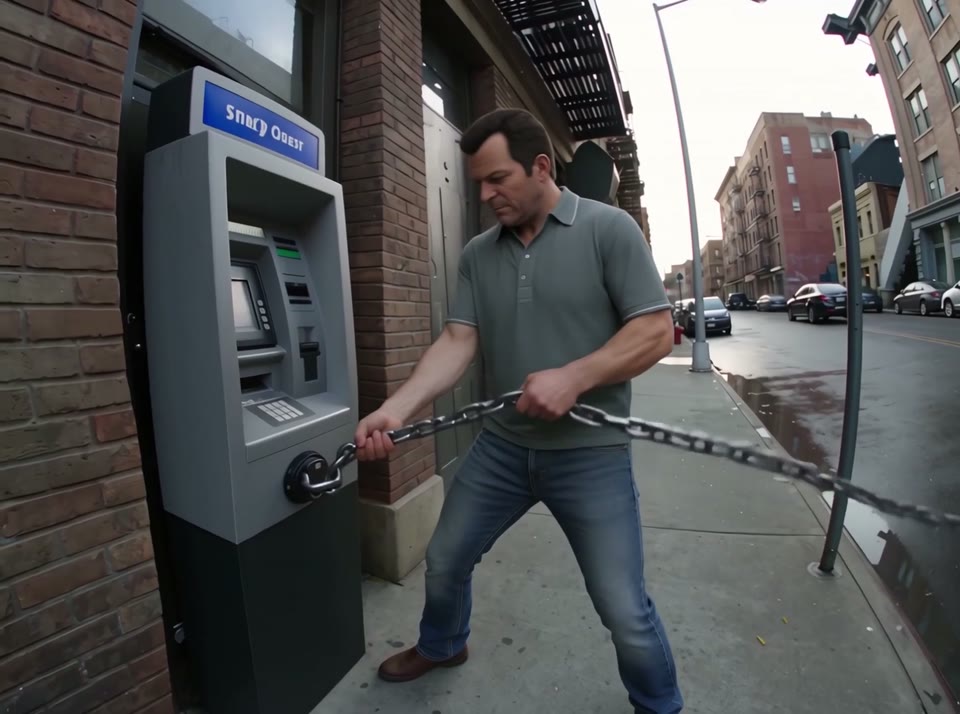
The ATM Heist template gives you a defined scene and an existing movement sequence to work with. Its visual setting is a fictional street action with a red car, chain and ATM, and the current template runs for approximately 12 seconds. Start by watching the reference from beginning to end. Understanding where the subject appears and how the shot develops makes choosing a useful input photo much easier.
What happens in this template
The car lifts an ATM as the lead holds the chain and later rides the airborne machine. The appeal comes from the relationship between the subject and the camera, rather than from a single attractive still. Keep that relationship in mind when planning your version. A recognizable subject at the beginning should still feel recognizable when the action develops. Treat the reference as a visual sequence with its own timing, supporting details, and ending.
Identify the replacement subject
The intended target is the character holding the chain and riding the ATM. Locate that subject in the preview before uploading anything. Other people, objects, or vehicles may be important to the composition without being replacement targets. A group scene does not automatically mean every person changes. Keeping the requested transformation focused on the designated subject gives you a clearer basis for judging the result.
Prepare a useful reference photo
Choose a clear photo of one person, with readable facial features, hairline, and shoulders. Avoid heavy face filters, large obstructions, and other faces in the background. When the reference includes full-body movement, a photo that also shows the outfit and body proportions gives you a more useful starting point. Leave some space around the subject and check the original image at a reasonable viewing size. If important features are already blurry in the photo, it will be difficult to assess whether the generated version preserved them. A viewpoint close to the reference is a practical first experiment. Establish a recognizable baseline before testing a more unusual appearance.
Generate your version
Open the template using the link below and play the full preview. Confirm both the movement and the target subject, then upload your chosen photo. Check that the crop retains the important parts of the reference appearance. Review the credits and available settings shown in the workspace before submitting. Processing time and cost depend on the current interface and settings; the guide does not assume a fixed turnaround or a guaranteed result.
Review the clip as moving footage
For this particular reference, pay close attention to chain-to-hand contact, body posture in the air and the ATM outline. Watch once at normal speed, then pause around movement changes, occlusions, or camera transitions. Compare the subject before and after those moments. One strong frame is useful for a cover, but it does not establish continuity throughout the video. If the identity or silhouette changes noticeably, revisit the clarity and viewpoint of the input photo before trying again.
Make each revision answer one question
A useful first revision has a specific purpose. For ATM Heist, start with the designated target: the character holding the chain and riding the ATM. If that subject is difficult to recognize, change the reference photo while keeping the same template. If the appearance is readable but the motion feels inconsistent, compare the result with the original sequence: The car lifts an ATM as the lead holds the chain and later rides the airborne machine. This helps distinguish a deliberate camera move from a continuity problem in the generated clip.
Avoid changing several decisions at once. Keep a note of the photo you used and the detail you wanted to improve, then compare the versions at matching moments. Look at the opening, the strongest action, and the ending rather than judging from a thumbnail alone. This simple comparison makes it easier to decide which version actually serves your idea.
Match the scene to your intended story
The setting, a fictional street action with a red car, chain and ATM, already establishes a mood. Let that setting guide the accompanying text: introduce the subject, give the action a little context, and leave the visual payoff room to land. Before choosing this template for a larger project, check whether its existing camera angle and supporting cast fit your intended message. For a connected series, consistent reference photos can make comparisons easier, but review every generated clip on its own merits. Save the strongest complete sequence, not merely the one with the most dramatic opening frame.
Shape the final presentation
Keep any caption close to the visible action. Avoid placing text over the subject or an important prop, and watch the downloaded clip once more before sharing. The cover for this article is an actual frame from the corresponding template video, so it introduces the same scene you will see in the preview. Use that preview to decide whether this visual idea suits your story, then build your own version around its strongest moment.